Character Controller
Character Controller是专为角色移动设计的物理组件,适合用于第一人称、第三人称角色控制,尤其适合需要“脚贴地”“走坡不滑”的场景
它和Rigidbody不同,不依赖物理引擎施加力,而是手动控制角色移动的逻辑,更稳定、精准、游戏性更强
Character Controller组件概览
它本质是一个内置Capsule Collider + 内部碰撞处理器,支持走地、上坡、碰撞、阻挡等功能
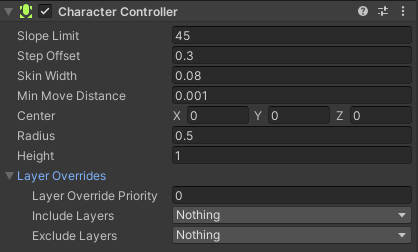
主要属性
| 属性 | 描述 |
|---|---|
| Center | 控制胶囊体中心位置 |
| Radius | 胶囊体的半径 |
| Height | 胶囊体高度 |
| Slope Limit | 可行走的最大坡度角(超过会滑下来) |
| Step Offset | 可“跨越”的台阶高度 |
| Skin Width | 贴地/贴墙容差,过小会穿透,过大会卡住 |
| Min Move Distance | 小于这个值的移动会被忽略 |
UnityManual CharacterController
常用方法
Move(Vector3 motion)
移动角色,内部会自动处理碰撞,返回碰撞信息
controller.Move(Vector3 motion * Time.deltaTime);
支持斜坡、台阶检测、滑动、墙体推开等逻辑
SimpleMobe(Vector3 motion)
简化版移动,自动应用重力,不需要乘以Time.deltaTime
controller.SimpleMove(new Vector3(x, 0, z));
适合简单控制,不建议用于精细角色控制
示例
public class PlayerMove : MonoBehaviour
{
    public float speed = 5f;
    public float gravity = -9.81f;
    public float jumpHeight = 1.5f;

    private CharacterController controller;
    private Vector3 velocity;
    private bool isGrounded;

    public Transform groundCheck;
    public float groundDistance = 0.4f;
    public LayerMask groundMask;

    void Start() => controller = GetComponent<CharacterController>();

    voie Update()
    {
        isGrounded = Physics.CheckSphere(groundCheck.position, groundDistance, groundMask);

        if (isGrounded && velocity.y < 0) velocity.y = -2f;

        float x = Input.GetAxis("Horizontal");
        float z = Input.GetAxis("Vertical");

        Vector3 move = transform.right * x + transform.forward * z;

        controller.Move(move * speed * Time.deltaTime);

        if (Input.GetButtonDown("Jump") && isGrounded)
            velocity.y = Mathf.Sqrt(jumpHeight * -2f * gravity);

        velocity.y += gravity * Time.deltaTime;
        controller.Move(velocity * Time.deltaTime);
    }
}
ChracterController vs Rigidbody
| 特性 | CharacterController | Rigidbody |
|---|---|---|
| 物理碰撞响应 | 自动响应 | 更精确 |
| 控制移动方式 | 手动调用 Move | 通过力或 velocity |
| 支持旋转 | 需要手动转动 transform | 支持 |
| 上坡台阶检测 | 自动处理 | 需要额外实现 |
| 重力 | 需手动实现 | 内建 |